
JusTalk - Video Chat & Calls
JusTalkCommunication
4.638.71K Reviews
- Version
- 8.14.4
- Installs
- 10.00M
- Age Rating
- Everyone
Screenshots


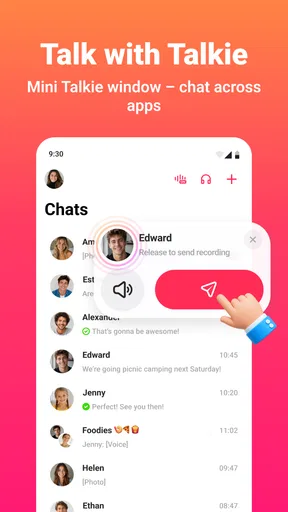


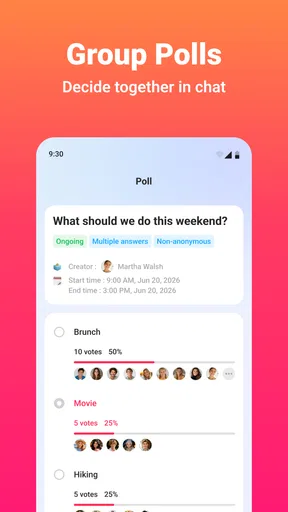


Our Review of JusTalk - Video Chat & Calls
 Analysis by Appyee
When I’m choosing a calling app, I care less about a long feature list than about whether the people I want to reach can actually join without a fuss. That is where JusTalk makes its case: it combines messaging and voice and video calls with group conversations, so it can serve as a shared place to catch up rather than just a button for starting a call. I see it as a particularly approachable choice for friends and families who enjoy talking face to face and want a little more playfulness than a bare-bones dialer offers.
Where it fits among communication apps
JusTalk is a free communication app from developer JusTalk, with optional in-app purchases ranging from $0.99 to $119.99 per item. It is rated for Everyone, and its reach is substantial: it has more than 10 million installs and a 4.6 average from around 313,000 ratings. Those figures suggest plenty of people have tried it, but they do not tell me whether my own circle is there. That practical question matters more than popularity: a calling app is only useful when the people you need can be reached on it.
Compared with a standard phone call, the appeal is visual and social: you can see the other person and, in a group, share a more lively conversation. Compared with work-focused meeting tools, JusTalk feels aimed at informal connection rather than scheduled presentations. I would not replace a dependable work conference setup with it just because it has group calling; for a family catch-up or a spontaneous chat, its lighter, more playful character is a better fit.
A practical way to bring people in
If I were introducing it to a family, I would start with one low-pressure call instead of asking everyone to move all their conversations at once. Pick a relative who is comfortable with apps, test a one-to-one call, then invite a few people to a group hangout. That small trial quickly answers the important questions for your group: whether everyone can get set up, whether the controls make sense, and whether the call works well on the connections they actually use.
For example, imagine trying to coordinate a Sunday catch-up while relatives are in different places. A quick group call lets everyone join the same conversation, while stickers, screen doodling, or a game can give younger family members something to do when the adults drift into a long story. Those extras are not essential, and some groups may find them distracting. I would treat them as optional icebreakers, not as the point of every call.
Text and voice options also matter when video is inconvenient. Someone may be commuting, in a noisy room, or simply not in the mood to be on camera. In those moments, switching to a message or voice conversation is more considerate than insisting on video. That flexibility makes the app easier to use as an everyday communication option, though I would still keep another way to contact someone for urgent situations in case they are not online or available.
What the version history can—and cannot—tell you
The app was released on February 19, 2014, and the current version is 8.12.1. That long span gives me a reason to view JusTalk as an established product rather than a brand-new experiment. It does not, by itself, prove that every call will be flawless or reveal which changes arrived in each release, so I would separate the product’s history from promises about performance. The useful test is still how it behaves for your contacts and devices today.
For someone who already uses it, a version number is a reminder to keep the app current when possible, especially if a contact is having trouble connecting. Before a planned group call, I would check that everyone can open the app and reach the intended people rather than discovering a setup snag at the agreed time. The minimum operating system is Android 6.0, which helps Android users judge basic compatibility; iPhone users should check the app’s current requirements on their own device before relying on it.
JusTalk has 39,000 written reviews alongside its ratings, but I would not treat any single crowd summary as a substitute for a personal trial. People use calling apps under very different conditions: home Wi-Fi, mobile data, older devices, and groups with varying levels of tech comfort. A short call with the people you plan to contact is a more useful check than assuming that another person’s experience will match yours.
Small choices that make calls easier
One useful habit is to agree on the purpose of a group call before starting it. If the goal is a quick family update, keep the group small enough that everyone can get a turn. If you are using a game or drawing feature, decide whether it suits the conversation; it can help break an awkward silence, but it can also pull attention away from a serious catch-up. The best feature is the one that supports the people on the call, not the one that happens to be available.
I would also make a simple backup plan with anyone who depends on the app to reach you. If a call does not connect, try a message or switch to an ordinary phone call rather than repeatedly tapping the call button. This is not a criticism unique to JusTalk; it is a sensible habit for any internet-based calling service, where both people’s access and connection affect the result.
Customization, such as choosing a theme or assigning a ringtone to a contact, can make the app feel more familiar. I would keep that practical: use a distinctive sound only if it helps you notice the calls you care about, and do not spend time tuning every setting before confirming that your main contacts can use the service. For many people, a reliable contact list and an easy-to-start conversation will matter more than cosmetic choices.
Who should choose it, and who might not
I think JusTalk is best for people who regularly make casual video calls and want conversation tools that can make a group feel less formal. Families with relatives in different locations, friends who like shared games, and small groups arranging informal catch-ups are the clearest matches. It is also worth considering if the people you contact are willing to install and learn one more app rather than sticking exclusively to text messages or regular calls.
I would skip it, or at least avoid making it my only communication channel, if my contacts are already settled in another service and do not want to switch. It may also be a poor fit for someone who wants a strictly utilitarian calling tool with no interest in stickers, games, or customization. People coordinating formal work meetings may prefer a platform designed around calendars and meeting workflows; those who need a conventional telephone connection should use a phone service that provides one.
Because the app is free to download but includes optional purchases, I would check what an offered purchase covers before paying, particularly if a child will use the device. The Everyone age rating is useful context, but it does not replace a parent’s own judgment about in-app spending or how a child communicates online. I would set expectations with younger users and keep purchases under adult control rather than assuming that free access means every part of the experience costs nothing.
Privacy, expectations, and everyday limits
The published description of JusTalk emphasizes end-to-end encryption, which is a reassuring privacy feature for calls and messages. I still recommend ordinary care: only connect with people you recognize, think before sharing sensitive information, and review the app’s current privacy and account settings yourself. Encryption is important, but it does not prevent someone on the other end from saving or repeating information you choose to share.
My main reservation is that no communication app can guarantee a smooth experience in every household. Group calls depend on the people joining, their devices, and their connections, and a playful interface will not suit every conversation. If you need predictable meeting controls, a work-oriented alternative may be more appropriate; if you simply want to reach one person quickly, a regular call may be simpler. I would choose JusTalk for the kind of conversation it makes enjoyable, not expect it to replace every way I communicate.
Overall, I see JusTalk - Video Chat & Calls as a friendly option for people who want video, voice, messaging, and group hangouts in one app, especially when making a call feel less stiff is part of the goal. Its long-running presence and broad adoption are encouraging, while a small trial with your own contacts is the best way to judge fit. If your circle is willing to use it and you value playful ways to interact, it is worth considering; if they already rely on another service or need a formal meeting tool, staying with that option may be the more sensible choice.
Have you ever wished you could have a smooth, seamless video call with your friends without worrying about connection issues or complicated interfaces? Well, let me introduce you to JusTalk - Video Chat & Calls. I recently gave it a whirl, and let me tell you, it's like having a personal video hotline in your pocket!
Getting Started with JusTalk
Diving into JusTalk is like slipping into your favorite pair of jeans. It's that comfortable and easy. The app is available on both Android and iOS, so no one's left out. Once downloaded, setting it up is a breeze. A few taps, a quick verification, and voilà, you're ready to chat or call.
The interface is clean and intuitive, exactly what you need when you're trying to connect with someone quickly. No unnecessary bells and whistles to distract you. Just straightforward access to your contacts and a big, friendly button to start your call. It's like the app is saying, "Let's get this party started!"
Features That Stand Out
Now, let's talk about what makes JusTalk shine. First off, the quality of the video calls is top-notch. Even on a not-so-great internet connection, the video and audio sync well, which is crucial when you're trying to catch up with a friend or have an important meeting.
Plus, JusTalk isn't just about one-on-one chats. You can easily create group calls, which is perfect for virtual hangouts or family catch-ups. It's like having a mini Zoom meeting but without the hassle of scheduling links and passwords.
One feature that really caught my eye is the fun interactive elements. You can draw on the screen while chatting, send stickers, and even play games together. It adds a playful element to your conversations, making them more lively and engaging. Imagine doodling a quick sketch to explain something or sending a funny sticker to lighten the mood. It's these little touches that make JusTalk feel personal and fun.
Privacy and Security
We all know how important privacy is these days, and JusTalk takes this seriously. The app uses end-to-end encryption, ensuring your conversations are private and secure. It's comforting to know that your chats and calls are protected, allowing you to focus on what matters—staying connected with your loved ones.
Furthermore, JusTalk doesn't bombard you with ads, which is a huge plus. It means your conversations are uninterrupted, and you won't find yourself accidentally tapping on an ad mid-call. Trust me, that's a relief!
Making the Most of JusTalk
So, how do you make the most of JusTalk? It's all about exploring the app's features and finding what works for you. Whether it's organizing a group study session, catching up with friends, or hosting a virtual game night, JusTalk has got you covered.
One thing I found particularly useful is the ability to customize the app. You can change themes and create personalized ringtones for different contacts. It adds a personal touch, making the app feel like it's truly yours.
Also, don't forget to explore the games you can play during calls. They're a fun way to break the ice and keep the conversation flowing. Whether it's a quick trivia game or a drawing challenge, it's bound to bring some laughs and smiles.
Final Thoughts
Overall, JusTalk - Video Chat & Calls is a fantastic app for anyone looking to stay connected with friends and family. Its user-friendly interface, high-quality calls, and fun interactive features make it stand out in the crowded world of communication apps. Plus, with its commitment to privacy and lack of intrusive ads, it's an app you can rely on.
So, why not give JusTalk a try? Whether you're planning a virtual hangout or just want to say a quick hello, JusTalk is ready to make your conversations more enjoyable and engaging. Go ahead, download it, and start chatting. You'll wonder how you ever managed without it!
Verdict
Strengths of JusTalk - Video Chat & Calls
- High-quality video calls with minimal lag.
- User-friendly interface that's easy to navigate.
- End-to-end encryption for secure conversations.
- Supports group chats with up to 50 participants.
- Fun doodling feature during video calls.
Limitations of JusTalk - Video Chat & Calls
- Occasional connectivity issues in low-signal areas.
- Some features require a premium subscription.
- Ads can be intrusive for free users.
- Limited customization options for profiles.
- Lacks integration with some social media platforms.
Other Releases by JusTalk
View All
JusTalk Kids - Safe Messenger
Communication4.7
Similar Picks in This Category
View All
Google Messages
Google LLC4.6

Gmail
Google LLC4.1

Google Meet
Google LLC4.4

Google Chrome
Google LLC4.1

WhatsApp Messenger
WhatsApp LLC4.6

Carrier Services
Google LLC4.2
Frequently Asked Questions
What features does JusTalk offer for video calls?
JusTalk provides a variety of features for video calls, including high-quality video and voice calling, group chats, and the ability to draw and share doodles during calls. You can also record your conversations and share them later. It’s designed to be user-friendly, making it easy to connect with friends and family.
Is JusTalk a secure platform for communication?
Yes, JusTalk prioritizes user security with end-to-end encryption for all calls and messages. This means your conversations are private and can only be seen by you and the person you are communicating with. The app is designed to ensure user privacy and protect sensitive information.
Can I use JusTalk on multiple devices?
JusTalk supports multi-device usage, allowing you to stay connected across different platforms. You can use the app on both Android and iOS devices, and it offers seamless integration, ensuring you can pick up conversations exactly where you left off, no matter the device.
Does JusTalk offer any customization options?
Yes, JusTalk offers several customization options to enhance user experience. You can personalize your chat themes, ringtones, and backgrounds. This allows you to tailor the app’s appearance to your preferences, making your interactions more enjoyable and unique.
What are the costs associated with using JusTalk?
JusTalk is free to download and use for basic features like video and voice calls. However, there are optional in-app purchases available, such as themes and additional features, that can enhance your experience. Despite these extras, the core functionalities remain accessible without any charges.
